User Experience Strategy
UG-Ability Testing
Conducted a usability study testing the functionality and accessibility of the University of Georgia mobile app

Goals
- Follow formal UX testing procedures while administering the study
- Collect functionality tasks, time on tasks, and system usability scale data
- Analyze results to report findings and inform future design recommendations
Role
UX Researcher
Timeline
July 2022
Platform
UGA App
Setting
Video Interview
Project Summary
For this project, I partnered with a classmate to conduct a usability study on the UGA mobile app. The testing procedure consisted of a testing script, functionality & time tasks, and a system usability scale to provide feedback on the user experience. Additionally, I analyzed the data to either support functioning components or proposed areas of improvement.
Testing Script
“Hi, Amanda. My name is Jeremi, and I’m going to be walking you through this session today. Before we begin, I have some information for you, and I’m going to read it to make sure that I cover everything. You probably already have a good idea of why we asked you here but let me go over it again briefly. We’re asking people to try using the UGA app to see whether it works as intended. The session should take about 10 minutes.
The first thing I want to make clear right away is that we’re testing the app, not you. You can’t do anything wrong here. In fact, this is probably the one place today where you don’t have to worry about making mistakes.
As you use the app, I’m going to ask you as much as possible to try to think out loud: to say what you’re looking at, what you’re trying to do, and what you’re thinking. This will be a big help to us. Also, please don’t worry that you’re going to hurt our feelings. We’re doing this to improve it, so we need to hear your honest reactions.
If you have any questions as we go along, just ask them. I may not be able to answer them right away, since we’re interested in how people do when they don’t have someone sitting next to them to help. But if you still have any questions when we’re done, I’ll try to answer them then. And if you need to take a break at any point, just let me know.
With your permission, I’m going to record what happens on the screen and our conversation. The recording will only be used to help me figure out how to improve the app, and it won’t be seen by anyone except me.
Any questions so far?
Before we look at anything, I’d like to ask you just a few quick questions.
- What are you studying at UGA? What do you do all day?
- What kind of mobile device (or devices) do you use, like a smartphone or a tablet?
- What kinds of things do you spend time doing on your mobile devices?
- Do you have any favorite mobile apps?
OK, great. Let’s start looking at things. First, I’m going to ask you to open up the UGA app.
Now, before you start doing anything, just look at the first screen and tell me what you make of it: what strikes you about it, what you think you can do with it, and what it’s for. Just look around and do a little narrative. You can scroll if you want, but please don’t “click” (or tap) on anything yet.
And again, as much as possible, it will help us if you can try to think out loud as you go along. I’m going to ask you to accomplish a series of tasks to the best of your abilities. Once you have completed the task, please hold up your phone so I can see.”
Results
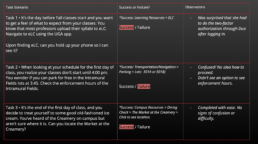
Functionality Tasks
Determined if the subject could successfully complete the task and recorded observations
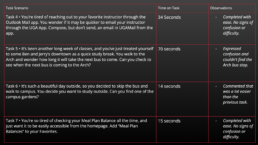
Time on Task
Determined how long it took the subject to complete the task and recorded observations
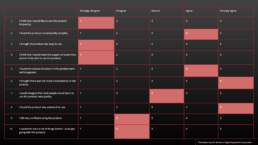
System Usability Scale
Asked the subject ten questions on the overall usability of the product from their experience
Analysis
Usability Findings
- The participant easily discovered how to access eLC and UGAmail, the location of physical places around campus, and add shortcuts to favorites through the app.
- The format of the homepage is organized well and allowed for easier access to the desired content.
- The interactive map with the bus stop and building markers was helpful in the user understanding of the location.
Usability Errors
- Slip in finding the enforcement hours intramural fields for Task 2. (Didn’t see the hours underneath).
- Mistake in finding when the next bus would stop at the Arch for Task 5. (Could have just gone to the map and clicked on the Arch to see when all bus routes would be stopping).
Task Success Rate
Task #1
100%
Confidence Interval:
I am 95% confident that the true completion rate falls between 22% and 100%.
Task #2
0%
Confidence Interval:
I am 95% confident that the true completion rate falls between 0% and 78%.
Task #3
100%
Confidence Interval:
I am 95% confident that the true completion rate falls between 22% and 100%.
Time on Task Results
I am 95% confident the true time on task is between 7.9% and 89.2%.
The statistic that best summarizes the time on task is the Geometric mean 26.6 seconds
System Usability Scale
S.U.S = 35
A score of less than 50 indicates that the product has major usability issues and needs improvement. So, in this case, the UGA app needs to be improved for better usability and efficiency.
Future Testing and Analysis
Card Sorting
Card Sorting:
To get more insight from the user into how the content should be organized in their opinion.
Learnability
Learnability:
For analyzing the data, it would be interesting to measure learnability and how fast the user learns to operate the app.